Collaborate as a team
Give colleagues access to the organization and understand which member actions are available.
Before you begin
Section titled “Before you begin”- You have opened the correct project and therefore the correct organization.
- For invitations and member management, the relevant action must be visible in your view.
- Have the invitee’s correct email address ready.
A new account automatically receives its own organization. A person can also receive invitations to other organizations.
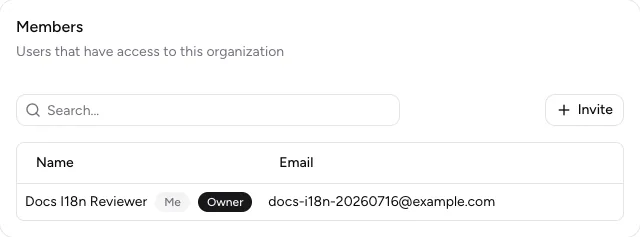
Organization settings contain members, roles, and the Invite action.
-
Invite a member
Open your user menu at the bottom of the sidebar and select Organization settings. In Members, select Invite, enter the email address, and confirm with Invite.
-
Respond to an invitation
The invited person signs in with the invited email address, opens the invitation link, and selects Accept Invitation or Decline.
-
Understand roles
Owner identifies the person who owns the organization. An Admin can manage members when the action is shown. A Member works in the organization but does not have general member management.
-
Change a role or remove a member
Owners and admins open the row menu for someone who is not the owner. Under Change role, they select Admin or Member; Remove revokes the person’s organization access.
-
Leave an organization
Admins and members open their own row menu and select Leave organization. This action is not shown to owners.
-
Change language
Open your user menu at the bottom of the sidebar, then Language, and choose Deutsch, English, or Français. The page reloads in the selected language.
If you leave or are removed from an organization, you lose access to its projects. Make sure the membership is no longer needed first.
Result
Section titled “Result”Invited people can join the organization. Roles and memberships match the way your team needs to collaborate.
If it does not work
Section titled “If it does not work”- If an invitation is invalid, ask your school’s Stundenwerk administrator to send a new invitation.
- If Invite or Change role is missing, the action is not available for your current role.
- If a project disappears after you leave, you need a new invitation to that organization.